

Apple Wallet gift card for business: a Christmas guide
An Apple Wallet gift card for business is a gift card your shop issues as a wallet pass. The buyer pays at your till. The card then goes to the recipient's phone, in Apple Wallet on iPhone or Google Wallet on Android. It shows the balance, and staff scan it to take off each spend.
This guide is about your own store's gift card in the wallet. If you want to buy Apple Gift Cards for staff or clients, that is Apple's separate business gifting program.
- Money is taken at your till, as it is today. The card keeps track of what is left.
- Staff scan the card with a free app or any phone browser and deduct the amount spent.
- A spend larger than the balance is refused, and every change is logged.
- In the US, money on a paid gift card generally cannot expire within five years of the last time value was added. Check your local rules too.
- The EpassCard Free plan covers 20 live passes with no payment card. Solo is $10 a month for 150 (as of Nov 2026).
How does a wallet gift card work at Christmas?
A wallet gift card works like a plastic one, but it lives in the phone. Someone buys it at your counter or online. You issue the card with a starting balance and send it by link, email or text. The recipient saves it to their wallet in one tap, with no app.
Here is the full trip, from sale to the last spend:
- Sale. A customer pays you for a gift card, in cash or by card, at your till.
- Issue. Staff create the card with the recipient's name and the amount paid.
- Send. The card's link goes to the buyer or straight to the recipient, by email or text. Email needs the email delivery switch turned on in the template.
- Save. The recipient taps Add to Apple Wallet or Add to Google Wallet. The card page shows the right button for each phone.
- Spend. At your counter, staff scan the card and deduct what the recipient spends.
- Update. The new balance shows on the phone. If the card stores the holder's email address, they also get an email about it.
The balance is a number that EpassCard tracks for you. It is not a payment card, and nobody taps it to pay. That keeps your till, your card fees and your bank exactly as they are.
When should you start selling Christmas gift cards in 2026?
Start in November. Christmas Day is Friday, Dec. 25, 2026 (U.S. Office of Personnel Management, as of Oct 2026). Have the card built and tested before Black Friday weekend. Then you can sell it from the first big shopping days to the last hours before Christmas.
| When | What to do |
|---|---|
| Now to mid-November | Build the gift card, test it on your own phone, and ask Google to approve your wallet account |
| Black Friday weekend (Nov. 27 to 29) | Put a sign at the till and start selling |
| Dec. 1 to 20 | Main selling weeks; send cards to buyers as they pay |
| Dec. 21 to 24 | Last-minute buyers: a wallet card needs no posting, so it still arrives in time |
| January | Remind holders to spend their balance in your quiet weeks |
Do the Google step early. Google Wallet passes stay in demo mode until you finish Google's one-time business approval. Apple Wallet needs nothing extra from you.
How do you set up the gift card in EpassCard?
You build one gift card template, then issue a card from it for every sale. There is no special Christmas design to pick. Start from the ready-made gift card and give it your holiday colors and a festive banner image.
- Create a free account at app.epasscard.com. The Free plan needs no payment card.
- Start a new template, open Choose a preset, pick Gift card and click Use this template.
- Add your logo, colors and a banner image. The Apple and Google previews sit side by side.
- Turn on Enable balance & transactions. This adds a number field called BALANCE to the top of the card.
- Delete the preset's sample "Balance" text field (it shows a made-up amount), so the card shows one balance. Rename BALANCE so the currency is clear, such as "Balance (USD)". The card does not add a currency sign for you. Use this same name in your push messages, as {Balance (USD)}. If you want a "From" line on the card, add a text field named From here too.
- Open Delivery & Sendout Options, choose Email and turn on Send email on pass creation, with the recipient set to {Email}. EpassCard then asks for the holder's email address each time you issue a card. It emails them the card, and it also emails them after each top-up or deduction. Without an email address, you share the card by link or QR code only.
- Set the expiry to Never Expires. In the US, money on a paid gift card generally must last at least five years from the last time value was added. A fixed date in EpassCard does not move when a customer tops up, so Never Expires is the safe choice. Add a back field that says "Funds on this card do not expire." The legal section below explains why.
- Save the template, then issue a test card to yourself and add it to your phone.
Bigger stores and brands can go further. You can issue cards in bulk from a spreadsheet, for example for a company that orders 200 cards for its staff. Your own software can issue cards through the API. For online sales, the free WordPress plugin works with PW Gift Cards and YITH Gift Cards.
How do you sell a gift card at the till?
Take the payment first, the same way you take any other payment. Then issue the card in the EpassCard dashboard with the recipient's name and the amount paid as the starting balance. Send the link by email or text, or let the buyer scan a QR code on the spot.
A few habits make the counter run smoothly:
- Ask who it is for. Put the recipient's name on the card, so it feels like a gift and not a receipt.
- Ask where to send it. Some buyers want the card themselves, to forward on Christmas morning. Others want it sent straight to the recipient. The email on the card also gets every balance email, so use the recipient's address when you can.
- Keep a sign at the till. A small "Gift cards in Apple Wallet and Google Wallet" sign starts the conversation for you.
- Text needs your own gateway. Text messages go through your own SMS provider. Email works without one.
If the buyer has no smartphone, the recipient can still use the card. Every card has its own web page with a QR code, which can be printed as a PDF and put in a holiday envelope.
How do staff redeem the card and handle a big bill?
Staff scan the card with the free EpassCard scanner app on iPhone or Android, or open the Transaction page at scan.epasscard.com in any phone browser. They see the available balance, type the amount spent, add a short note and confirm. The card on the phone updates, which can take up to a minute.
If the bill is bigger than the balance, EpassCard refuses the deduction. Staff deduct what is left on the card, and the customer pays the difference by cash or card. The card can never go below zero.
Every change is written to the card's history: the type, the amount, the note, who did it and when. If the card has the holder's email address, they also get an email for each top-up or deduction. This applies to changes made in the scanner app or on the dashboard's Transaction screen. That record helps when someone asks, "How much is left on my card?"
You can give each staff member their own role, so only the people you choose can change balances. Note that on a gift card, anyone who can take off a spend can also add value. Give that right only to staff you trust with the till. Other staff can still verify cards or add stamps without touching balances.
Can customers top up the card after Christmas?
Yes. A top-up adds value to the same card, so nobody needs a new one. The customer pays at your till first. Then staff scan the card and add the amount, with a note such as "January top-up". The new balance shows on the phone, and the history records it.
Top-ups are a good fit for the quiet weeks after the holidays. A recipient who liked your shop can load their card for next month's visits.
What does US law say about gift card expiry?
In the US, a federal rule, 12 CFR 1005.20, covers store gift cards. In general, the money on a store gift card cannot expire until at least five years after value was last added to it. If a card or its funds can expire, the card must show when the funds expire (Consumer Financial Protection Bureau, as of Oct 2026). If the card and its funds never expire, that notice is not required (CFPB official interpretation, as of Oct 2026).
The same rule limits inactivity and service fees. Cards given away free in a loyalty, award or promotional program are treated differently. Many states add stricter rules on top, and other countries have their own laws.
So check the law where you trade before you set an expiry date. This guide is not legal advice. The safe default for a paid gift card is Never Expires. The law does not ask for a "Funds do not expire" line on a card like that. Still, it is good practice to add it to the back with your terms. It answers the buyer's first question. If a card does expire, the rule asks for more, such as the expiry date and a toll-free number for a replacement card.
Which push messages should you send?
Send few messages, and make each one useful. You can message one card holder or everyone with the card, now or at a set time. Messages can include any field on the card. Type the field name in curly brackets, exactly as it is labeled, such as {Full name} or {Balance (USD)}. The send screen lists the names you can use. A name that does not match a field is sent as typed, so send a test to your own card first. The balance shows as a number only, so add the currency in your text, such as "You have ${Balance (USD)} to spend." Three messages cover most of a gift card's life:
- When the card arrives: "Hi {Full name}, your gift card from [your store] is ready. You have ${Balance (USD)} to spend."
- After a top-up or a big spend (sent by you to that card): "Your gift card now has ${Balance (USD)} left."
- In January: "You still have ${Balance (USD)} on your gift card. Come in this week and treat yourself."
On iPhone, the message shows on the lock screen. Google allows up to 3 messages that trigger an alert per card in 24 hours (Google for Developers, as of Oct 2026). Only message people who saved your card. They can remove it at any time, and the consent and privacy rules where you trade still apply.
Can you pair the gift card with a holiday stamp card?
Yes, and it gives gift card buyers a reason to come back. A holiday stamp card rewards visits, while the gift card holds money. Here is an illustrative example, not a real customer. A café runs a buy 9 get 1 free drink card through December. You build it in the stamp card wizard, starting from one of the 24 ready-made designs. You set the number of stamps and the offer in Stamp Settings. In the last step, Settings, turn on Public Pass Create so customers can join without logging in. Save the card, then share its public link as one QR code at the till.
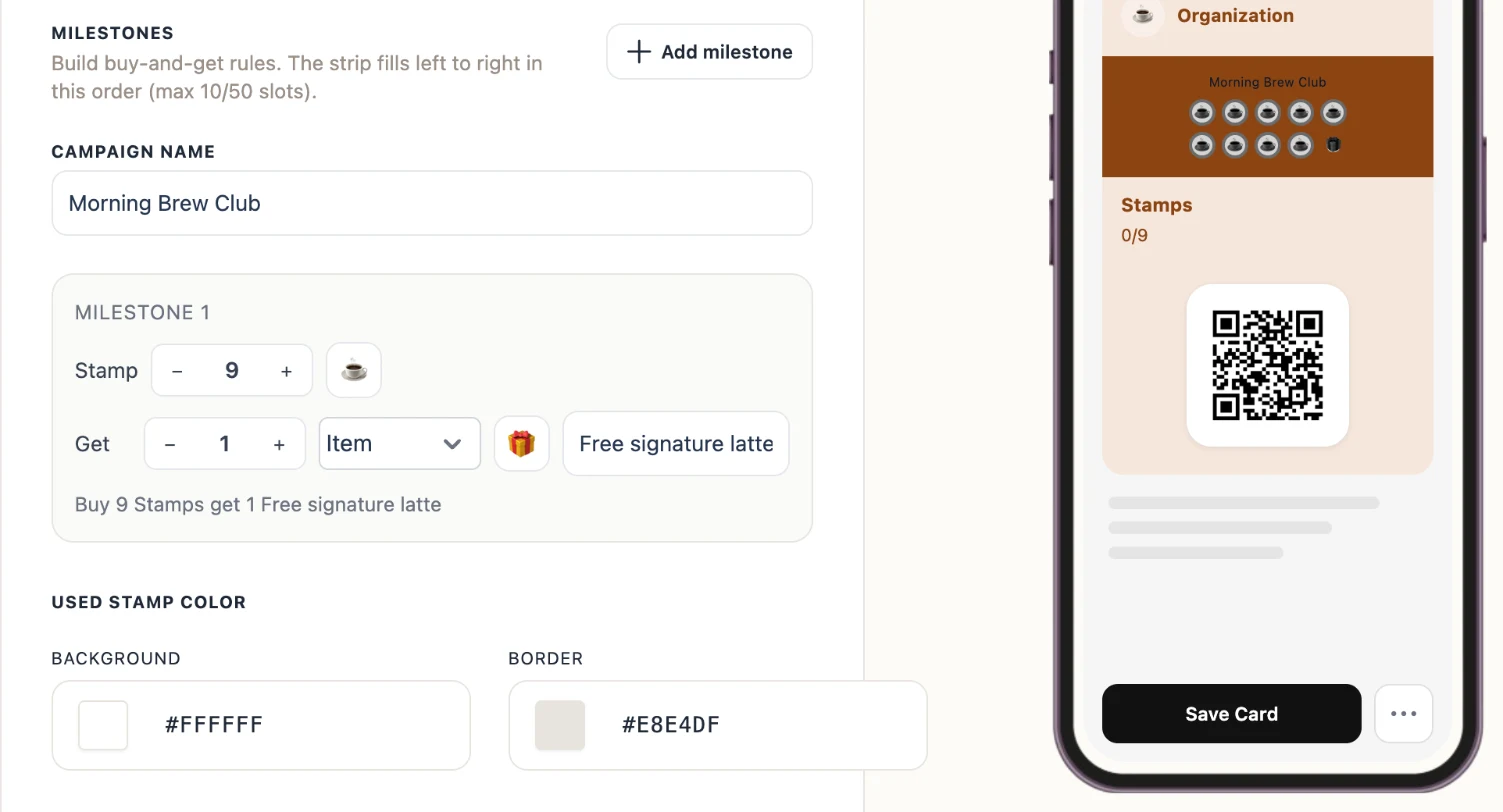
Staff add a stamp with each scan. Our digital stamp card guide covers the full setup.
What does it cost to run wallet gift cards?
You can start on the Free plan with 20 live passes and 1 template. Paid plans are priced by live passes and templates, not by staff, so team members are free on every plan. Prices are from the EpassCard pricing page as of 12 Nov 2026.
| Plan | Monthly | Yearly | Live passes |
|---|---|---|---|
| Free | $0 | $0 | 20 |
| Solo | $10 | $96 | 150 |
| Launch | $15 | $144 | 300 |
| Team | $29 | $276 | 1,000 |
| Plus | $45 | $432 | 2,500 |
| Business | $65 | $624 | 5,000 |
Live passes are a total of the cards in use, not a monthly allowance. Here is a worked example. Say a café already has 40 stamp cards in use and sells 120 gift cards in December. That is 160 live passes, more than the Free plan's 20 and Solo's 150. Launch covers up to 300 for $15 a month. The plan price is not the whole cost: your usual card fees on each sale still apply.
A spent card still counts until you delete it. Deleting a pass frees its slot, but the card stays on the customer's phone as it was. Expired or switched-off cards still count. Every plan includes unlimited push messages and 24/7 support.
What can a wallet gift card not do?
It is a simple tool, and it has limits. Know them before your first sale:
- It does not take payment. Money goes through your till or online checkout. The card only tracks the balance.
- It is not tap-to-pay. Staff scan the barcode; the card is not added to Apple Pay.
- Google Wallet needs one approval. Cards stay in demo mode until you finish Google's one-time business step.
- Google limits alerts. Up to 3 alerts per card in 24 hours.
- Updates are not immediate. A new balance can take up to a minute to show on the phone.
- There are no currency rules. You name the balance field, and your staff count in your currency.
None of this stops a shop from selling gift cards this Christmas. It shapes how you train staff and what you tell buyers. When you are ready, create your free gift card and add it to your own phone first. You can also see what the card looks like on the gift card page.
Frequently asked questions
Can someone buy the gift card online instead of at the counter?
Yes, if your online checkout can issue it. On WordPress, the free EpassCard plugin works with PW Gift Cards and YITH Gift Cards. Other stores can issue cards through the EpassCard API after payment. EpassCard does not take the payment itself; your checkout does.
What happens if the recipient loses or changes their phone?
If they changed phones, they can open the card's link or email again and add the same card to the new phone. If the phone was lost, look up the card in your dashboard and switch it off so the old barcode stops working. Then issue a new card with the remaining balance from the transaction history. The switched-off card still counts toward your live passes until you delete it.
Do recipients need to download an app?
No. iPhone users save the card to Apple Wallet and Android users save it to Google Wallet. Both come with the phone. The EpassCard app is an optional extra for Android users.
Can the same gift card be used at all my locations?
Yes. The balance is kept in your EpassCard account, not on one till. Staff at any location scan the card with the scanner app or a browser and see the same balance and history.
Can I sell gift cards in amounts other than round numbers?
Yes. The starting balance is whatever the buyer paid, such as 35 or 75. Staff enter it when they issue the card, and later spends and top-ups change it from there.