

Apple Wallet coupons: how to create and send one
Apple Wallet coupons are passes that live in the Wallet app on iPhone. Each one shows your offer, an expiry date and a barcode. You create the coupon with a wallet pass tool and send a link or QR code. The customer taps Add to Apple Wallet, with no app to install. The same coupon also works in Google Wallet.
What is an Apple Wallet coupon?
An Apple Wallet coupon is a digital pass for one offer, such as 20% off or a free coffee. It shows your logo, the offer, a code and a barcode. The expiry date and the terms sit on the back of the pass.
Apple has a coupon style made for this. It has room for a logo, an icon and a wide strip image across the top (Apple Wallet Developer Guide).
On Android, the same coupon goes into Google Wallet. Google lays the fields out a little differently. The offer, the code and the barcode stay the same.
The coupon sits next to the customer's boarding passes and loyalty cards. Nobody has to search their inbox at the till or open a store app.
How do customers add a coupon to Apple Wallet?
Customers tap a link or scan a QR code, then tap Add to Apple Wallet. That is the whole flow. Apple describes the same steps for any pass. You open the message or page with the pass, tap the button, then tap Add if asked (Apple Support).
You can hand the link out in several ways:
- A QR code on a poster, a table card or a receipt
- An email with Add to Apple Wallet and Add to Google Wallet buttons
- A text message with the link
- A sign-up form on your own website, so new customers get the coupon when they join
With EpassCard, every coupon has one short link. An iPhone sees the Apple Wallet button. An Android phone sees Google Wallet. A computer shows a QR code to scan with a phone.
How do you create an Apple Wallet coupon?
You can build a coupon pass yourself with Apple's developer tools. That route needs an Apple Developer account, a pass type ID and a signing certificate. Most shops use a wallet pass tool instead. In EpassCard the steps look like this:
- Create a new template and pick the Coupon preset.
- Write the offer in a few words, such as "20% off your next visit". Put the terms on the back.
- Add your logo, your colours and a strip image. The live preview switches between the Apple and Google versions.
- Pick a barcode type. A QR code works with the free scanner app.
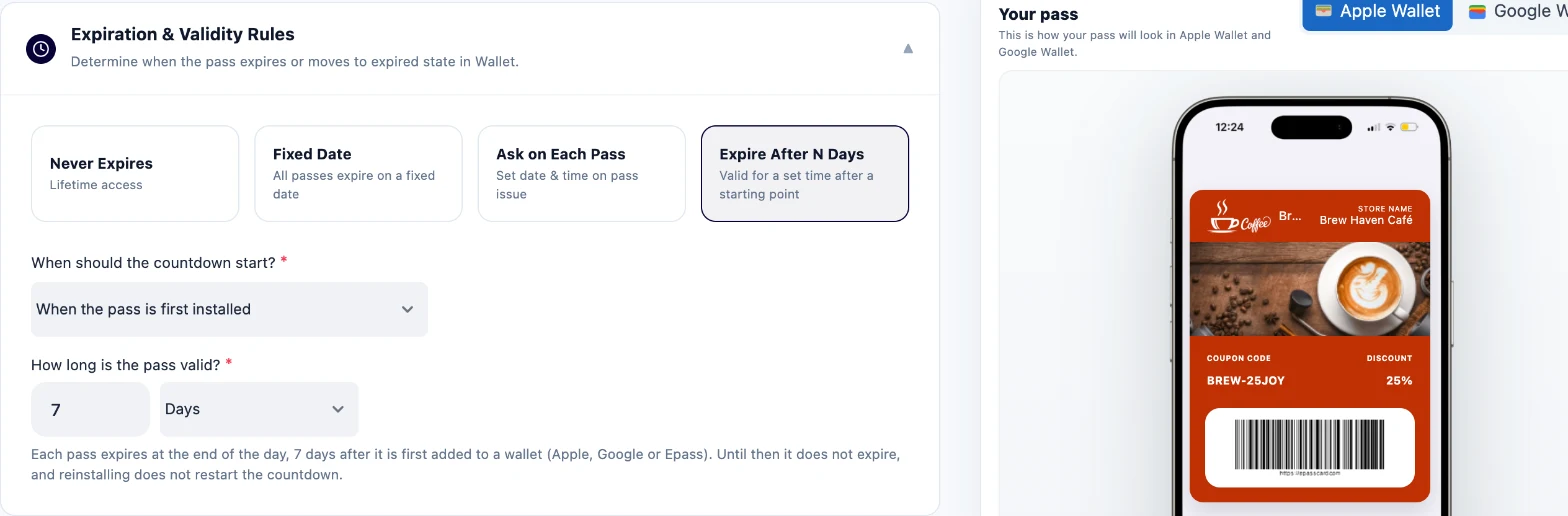
- Set the expiry: a fixed date, or a number of days after the customer adds the coupon.
- Add up to 10 shop locations if you want the coupon to appear on the lock screen nearby.
- Save the template, then copy the share link or the QR code.
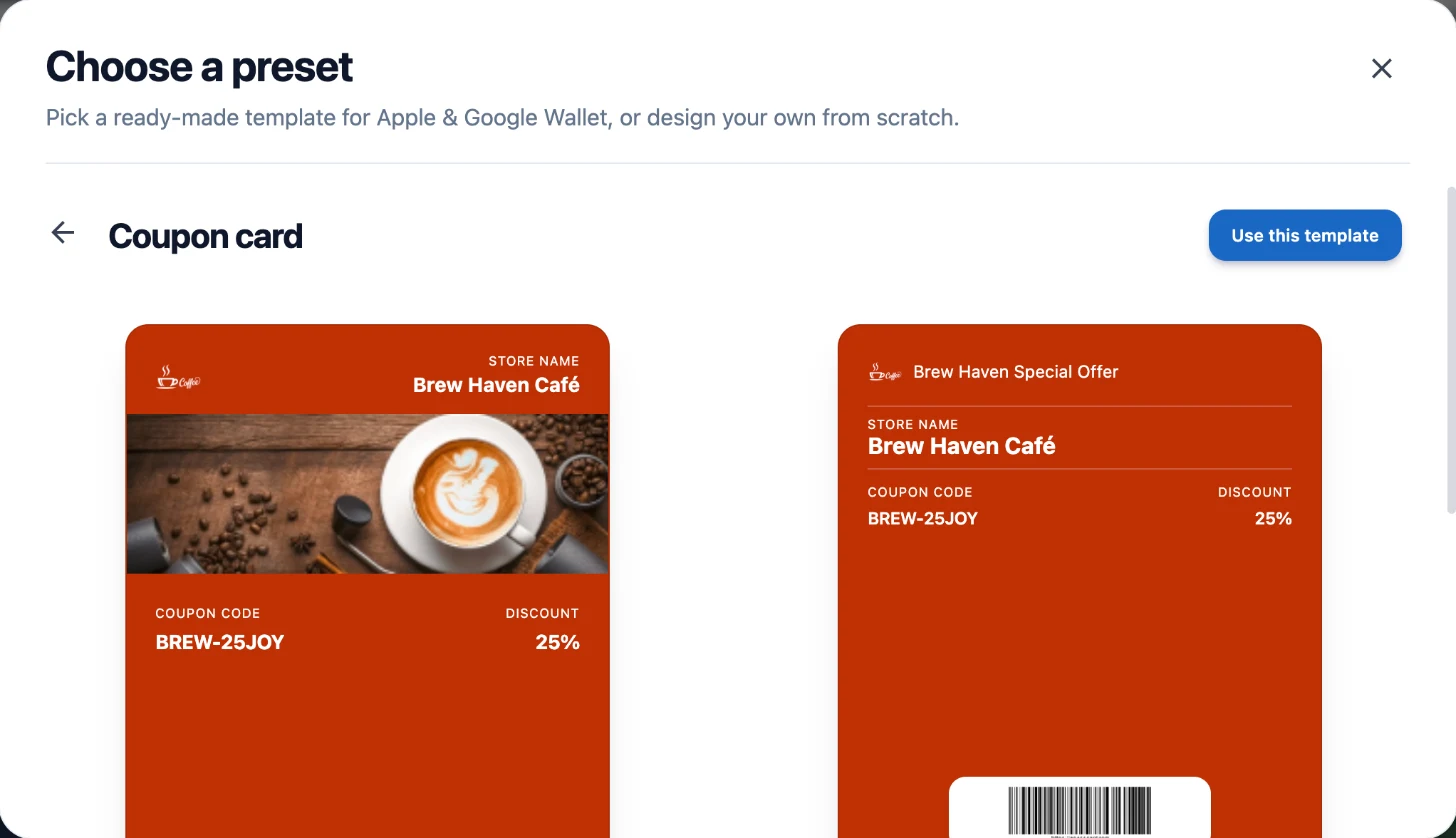
The coupon card page shows more coupon ideas. The documentation explains each setting.
How does redemption work at the till?
Staff scan the coupon with the free EpassCard scanner app and claim it. The coupon is then used up and expires. The same code cannot be used twice.
The coupon does not change the price on its own. Your till or card machine still applies the discount, just as it would for a paper voucher. The scan proves the coupon is real and stops anyone using it again.
When should the coupon expire?
Match the expiry to the offer. A fixed date suits a sale with a clear end, such as a weekend promotion. "Days after the customer adds it" suits an ongoing offer, such as "7 days to use your welcome discount". Each customer then gets the same window from the moment they save it.
When a coupon expires, it greys out in the wallet and the barcode stops working.
Google Wallet can send an automatic reminder two days before an offer ends (Google for Developers). That reminder only covers passes issued as Google Wallet offers. EpassCard sends coupons to Google Wallet as standard passes, so it does not apply. Schedule your own reminder message a day or two before the end date instead.
Can you change a coupon after you send it?
Yes. Change the offer text, the expiry or the design, and every saved coupon updates on the customer's phone. An update can take up to a minute to arrive.
You can also send a push message to everyone who holds the coupon, such as "Your 20% off ends Sunday." On iPhone the message shows on the lock screen. Google Wallet shows up to 3 alerts per card per day, so save messages for real news.
Customers stay in control. They can delete the coupon from their wallet at any time.
What can't an Apple Wallet coupon do?
A coupon is simple on purpose. Know these limits before you plan a campaign:
- It does not apply the discount. Staff still enter it at the till.
- It works once. For a discount people use again and again, use a store card with a balance, or a stamp card for repeat visits.
- Location is opt-in and quiet. Apple brings a coupon to the lock screen only when the customer is close, roughly within a hundred metres. It does not post an alert for that (Apple Wallet Developer Guide). The customer must also allow location for Wallet.
- It is shown, not tapped. Customers show the barcode. They do not tap the phone on a card reader.
- Google Wallet needs one approval step. Google passes stay in demo mode until you finish Google's free business check once. Here is how to take Google Wallet passes live.
What does it cost?
The prices below come from the EpassCard pricing page as of 15 Oct 2026.
| Plan | Price | Live passes | Templates |
|---|---|---|---|
| Free | $0 | 50 | 3 |
| Starter | $19 a month | 250 | 5 |
| Growth | $39 a month | 1,000 | 10 |
"Live passes" means coupons and cards in use at the same time. It is not a monthly allowance. Every plan includes push messages, the scanner app and landing pages. You pay no Apple Developer fee.
Here is a worked example. A café sends a welcome coupon to 200 new customers in a month. That is more than the Free plan's 50 live passes, so it fits Starter. When old coupons expire and are deleted, their slots free up for new ones.
Start with one coupon
Pick one offer you already run on paper. Build it as a coupon and print the QR code at the till for a week. Then count the claims in your scan history. After that, decide whether to send it by email or text as well.
You can try it on the Free plan with 50 live passes: start free on EpassCard.
Frequently asked questions
Can I add any paper coupon to Apple Wallet?
Not by yourself. The business that issues the coupon has to offer it as a wallet pass. If there is no Add to Apple Wallet button, the store does not support wallet passes yet.
Does the customer need an app to save the coupon?
No. Apple Wallet comes with every iPhone, and Google Wallet is free on Android. The customer only taps the wallet button on the link or after scanning the QR code.
Can a customer use one coupon twice?
No, as long as staff claim it in the scanner app when they scan it. The coupon is then marked as used and greys out in the wallet.
Do I need an Apple Developer account?
No. EpassCard signs the passes for you. For Google Wallet you use your own free Google account and complete Google business verification once.
Can each customer get a different code?
Yes. The barcode can carry each pass its own ID, so every coupon is unique and can only be claimed once.