

Digital boarding passes for ferries and bus operators
A digital boarding pass for ferries and bus tickets in Apple Wallet and Google Wallet. One pass per passenger, scanned at boarding, updated on delays.
Updated October 2026
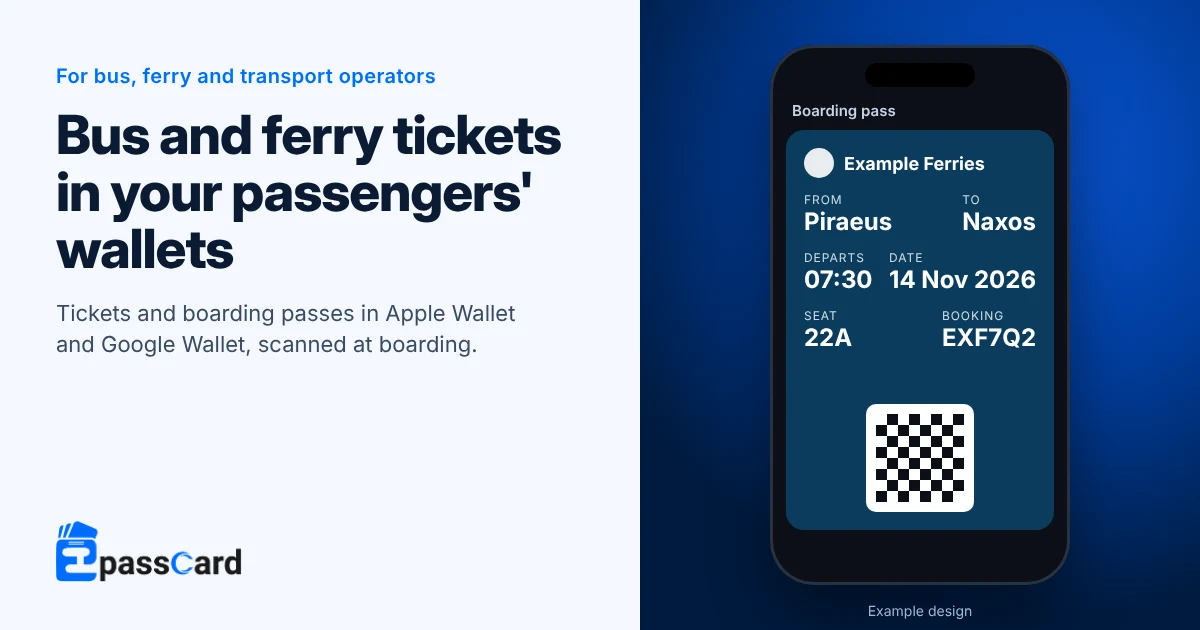
A digital boarding pass for ferries is a ticket your passengers keep in Apple Wallet or Google Wallet instead of on paper. With EpassCard, your booking system issues one pass per passenger through the API. Crew scan it at boarding with a free app, and you can message passengers about a delay.
Key takeaways
- Passengers add the pass from an email or text link. They install no app and create no account.
- Layouts cover boarding passes, bus, train, launch and ship tickets, with times in each port’s local time.
- One booking can cover several passengers.
- Crew scan with the free scanner app or a phone browser; you need no gates.
- Plans start free with 50 live passes; Business is $65 a month for 5,000 (as of October 2026).
What does a ferry or bus pass show?
The transit layout uses a fixed catalog of fields. You switch each field on or off and rename its label, such as “Ghat” or “Berth”.
| Field | Example |
|---|---|
| Operator, route or vessel | Example Ferries, Piraeus to Naxos |
| Date, departure and arrival | 14 Nov 2026, 07:30 to 12:45 (local time at each end) |
| Seat, berth, coach or cabin | Seat 22A, Cabin 4 |
| Gate or platform | Gate E7 |
| Booking reference | On the back of the pass |
The pass expires the day after departure, so old tickets do not pile up in passengers’ wallets.
How does a wallet ticket work from booking to boarding?
Your booking system stays in charge of seats and payment. EpassCard turns each confirmed booking into a pass.
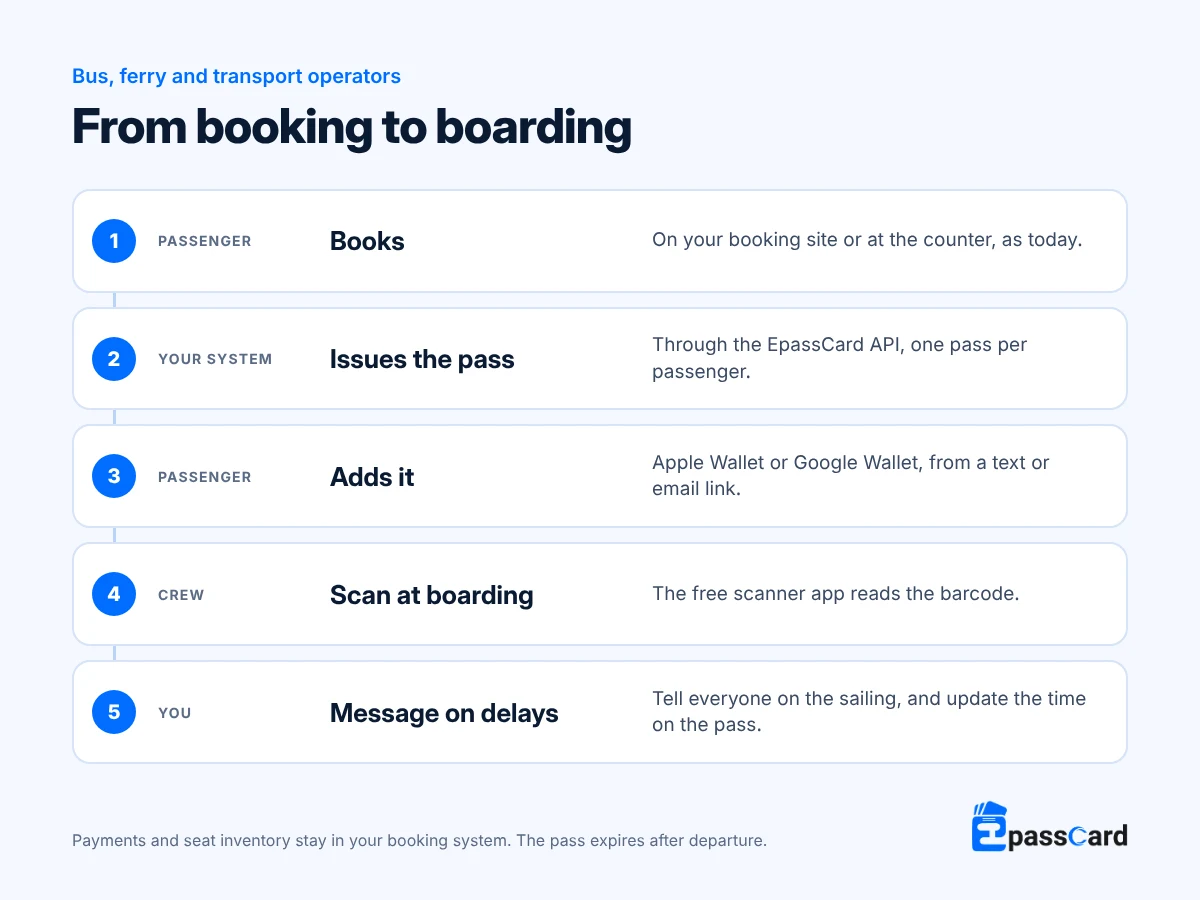
When a departure time changes, update the pass and message each affected passenger, or every holder at once if each sailing has its own template. The change shows on the pass, usually within about a minute. Passengers chose to add the pass and can remove it; send service updates rather than promotions unless they agreed to marketing. On Android, Google allows 3 alerting messages per pass in a day.
Is this the same as tap-to-pay transit cards?
No. Some city transit systems let riders tap a phone at the gate to pay a fare. Those work through the transit agency’s own fare system. Google Wallet’s own visual transit tickets for public transport are issued through its affiliated partners (Google Wallet developer docs).
EpassCard issues a ticket with a barcode for operators who sell their own tickets, such as ferry lines, intercity coaches and tour boats. Apple’s developer documentation lists bus and train tickets as uses for its boarding pass type (Apple Developer).
Example: how a ferry operator in Greece would set it up
Illustrative scenario, not a customer. An island ferry line sells tickets online and at the port. Paper tickets get wet and lost, and the call center is busy on stormy days.
- The booking site calls the EpassCard API for each confirmed booking. Every passenger on the booking gets their own pass.
- Passengers receive the pass by email and add it to Apple Wallet or Google Wallet.
- Crew scan passes at the ramp with the free scanner app on phones.
- Each sailing has its own template. When weather delays one, a single message reaches every passenger on it, and the new time shows on each pass.
Example: how a coach company in Peru would set it up
Illustrative scenario, not a customer. An intercity coach company sells seats at stations and online, and drivers check paper tickets by hand.
- Each booking issues a bus ticket with the seat, boarding station and departure time.
- Drivers scan tickets at the door with a phone; every scan is logged.
- Passengers who book at the station get the pass link by text through the company’s own SMS provider.
How do you set up a digital boarding pass for ferries?
- Create a free account at app.epasscard.com.
- Choose the transit kind (boarding pass, bus, train, launch or ship) and switch on the fields you use.
- Rename labels to match your tickets.
- Connect your booking system through the developer API, or upload a CSV per departure for a trial.
- Give crew the scanner app and test one booking with two passengers.
What does it cost?
Plans are priced by the total number of live passes you hold at once. Each passenger’s pass counts until it expires the day after departure.
| Plan | Live passes | Monthly | Yearly |
|---|---|---|---|
| Free | 50 | $0 | $0 |
| Business | 5,000 | $65 | $540 |
| Scale | 25,000 | $229 | $1,920 |
| Scale+ | 50,000 | $399 | $3,348 |
Prices from the EpassCard pricing page as of October 2026. Growth ($39 for 1,000) and Pro ($119 for 10,000) sit between these. Custom packages are available on request.
For example, an operator with 300 passengers a day, booking up to 14 days ahead, could hold up to about 4,800 live passes at once. That fits Business at $540 a year, close to its 5,000 limit.
What it does not do
- It does not sell tickets, manage seats or take payment.
- It is not a tap-to-pay transit card; crew scan a barcode.
- The transit layout uses a fixed list of fields; you rename them but cannot add your own. See the documentation for the full list.
- It does not provide live flight tracking for airline boarding passes.
- Passes in Google Wallet stay in demo mode until the operator completes Google’s one-time business verification.
FAQ
Can a small ferry or coach company issue Apple Wallet boarding passes?
Yes. EpassCard issues boarding passes and bus, train, launch or ship tickets without an Apple Developer account. Your booking system sends each booking through the API, or you upload a CSV per departure. Passengers add the pass to Apple Wallet or Google Wallet.
How do drivers or crew check a wallet ticket?
They scan the barcode with the free EpassCard scanner app on a phone, or with a phone browser. A handheld or USB barcode reader also works with browser scanning. Every scan is logged with the staff member and time, so you can see who boarded each departure.
Can one booking hold several passengers?
Yes. Bookings with several passengers are supported, with each traveler’s name and seat under the same booking reference. A family can keep the passes together on one phone, or share the links so each person carries their own.
What happens to the pass after the trip?
The pass expires the day after departure. It grays out in Apple Wallet, shows as expired in Google Wallet, and its barcode stops working. Passengers can remove it, and a new booking issues a new pass. Expired passes cannot be reused for another trip, so old tickets cannot be shown again at boarding.
Can we message passengers about a delay?
Yes. Update the departure time on the pass and send a message to the passengers affected. If each sailing has its own template, one message reaches everyone on it. Google Wallet shows a phone alert for up to 3 messages per pass a day.
Test it on one route free
Issue up to 50 passes on the Free plan and test one route end to end, with no credit card needed. Start free, or book a demo to plan an API connection.