

Digital stamp card for small business: switch in a week
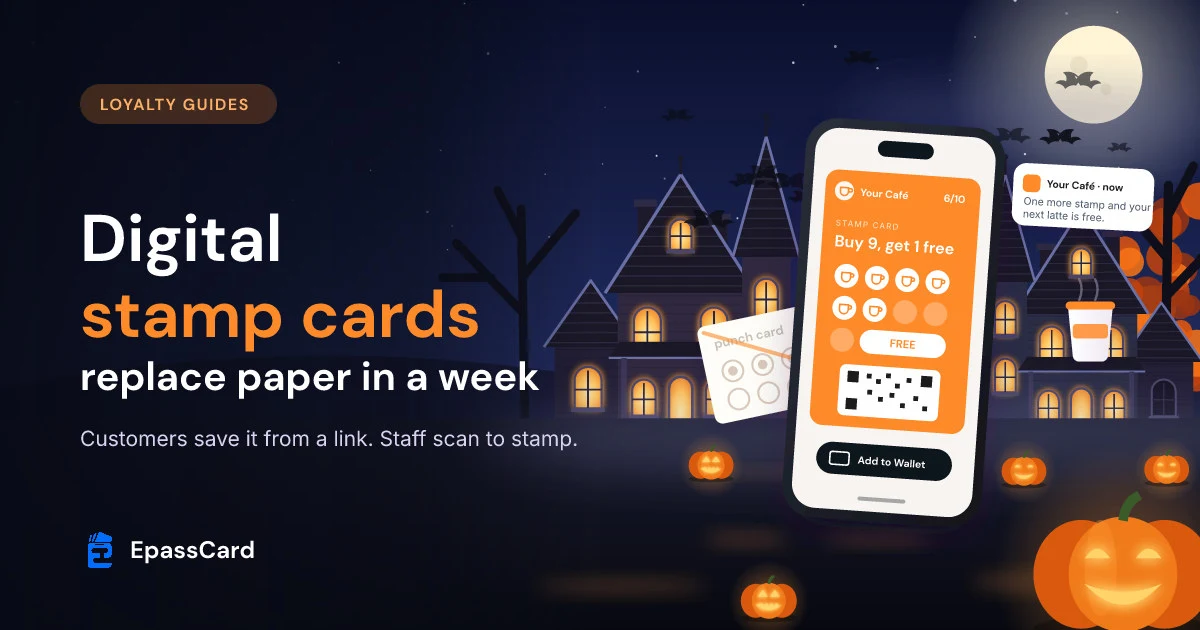
A digital stamp card for small business is a punch card in Apple Wallet or Google Wallet. Customers save it from a link or QR code, with no app. Staff scan it to add a stamp. A café, salon or gym can launch on iPhone in a week and add Android once Google approves. Paper goes over the next month.
- Customers need no app. The card goes into the wallet that is already on their phone.
- Staff add stamps by scanning the card. Stamps never come from the till total by themselves.
- Customers keep their paper stamps: staff add them to the new card in one scan.
- The EpassCard Free plan covers 50 live passes. Starter is $19 a month for 250 (as of Oct 2026).
What is a digital stamp card, and how is it different from paper?
A digital stamp card is the same "buy 9, get 1 free" deal as a paper card. The difference is where it lives. It sits in the customer's phone wallet, with the stamps drawn on the card. You can update it or message it after you hand it out.
The same card works in Apple Wallet on iPhone and Google Wallet on Android.
| Paper punch card | Digital stamp card | |
|---|---|---|
| Where it lives | A wallet, a pocket or the bin | Apple Wallet or Google Wallet |
| Adding a stamp | Ink stamp or hole punch | Staff scan the card |
| Checking stamps | Hard to tell a real stamp from a copy | Every stamp is logged with time and staff member |
| Reaching the customer | Not possible | Push messages to one card holder or everyone |
| Printing | Reprint when you run out | Nothing to print except one QR code |
On an EpassCard digital stamp card, with stamps on the strip, earned stamps show in color and the rest are faded. The reward slot is marked FREE. With the simpler dots layout, progress shows as a row of dots instead. Customers see their progress as "4/10" each time they open the card.
Which small businesses suit a stamp card?
A stamp card suits any business where people come back often and spend about the same each time. Think coffee shops, bakeries, salons, barbers, car washes, nail bars and gyms with class packs. The reward is simple: a free coffee, a free wash or a free class.
Pick the card that fits the reward you want to give:
- Stamp card: rewards visits, such as "buy 9, get the 10th free".
- Loyalty card with points: rewards spend, such as points per dollar entered by staff.
- Coupon: a one-off discount used once. Our guide to Apple Wallet coupons covers those.
If your prices vary a lot, points may be fairer than stamps. A small coffee and a long color treatment should not earn the same reward.
How do you set up a digital stamp card in EpassCard?
You build the card once from a ready-made design, then share one link or QR code. EpassCard has 24 stamp card designs for cafés, restaurants, car services, salons, spas, fitness and retail. A six-step wizard walks you through the rest.
- Create a free account at app.epasscard.com.
- Open Stamp Cards and click Create new template. Pick the design closest to your business.
- General: choose the card layout: stamps on the strip, or a row of dots. Add your logo, colors and strip image, and choose which details to ask customers for.
- Stamp Settings: set your offer, such as "Buy 9 stamps, get 1 free", and pick the stamp icon, such as a coffee cup or scissors. You can add more than one offer: up to 50 slots in total with stamps on the strip, or 10 with the dots layout. Each offer gives an item staff hand over, points, or a message sent to the customer. You can also turn on Lock stamp removal here.
- Front Information and Back Information: add your terms, address and opening hours.
- Sendout: choose how new cards reach customers, such as email, or a text message through your own SMS gateway.
- Settings: name the card, add a short description, pick the barcode and an expiry if you want one. Turn on Public Pass Create so customers can add the card from your link or QR code. Then click Save Card. The link to share appears once the card is saved.
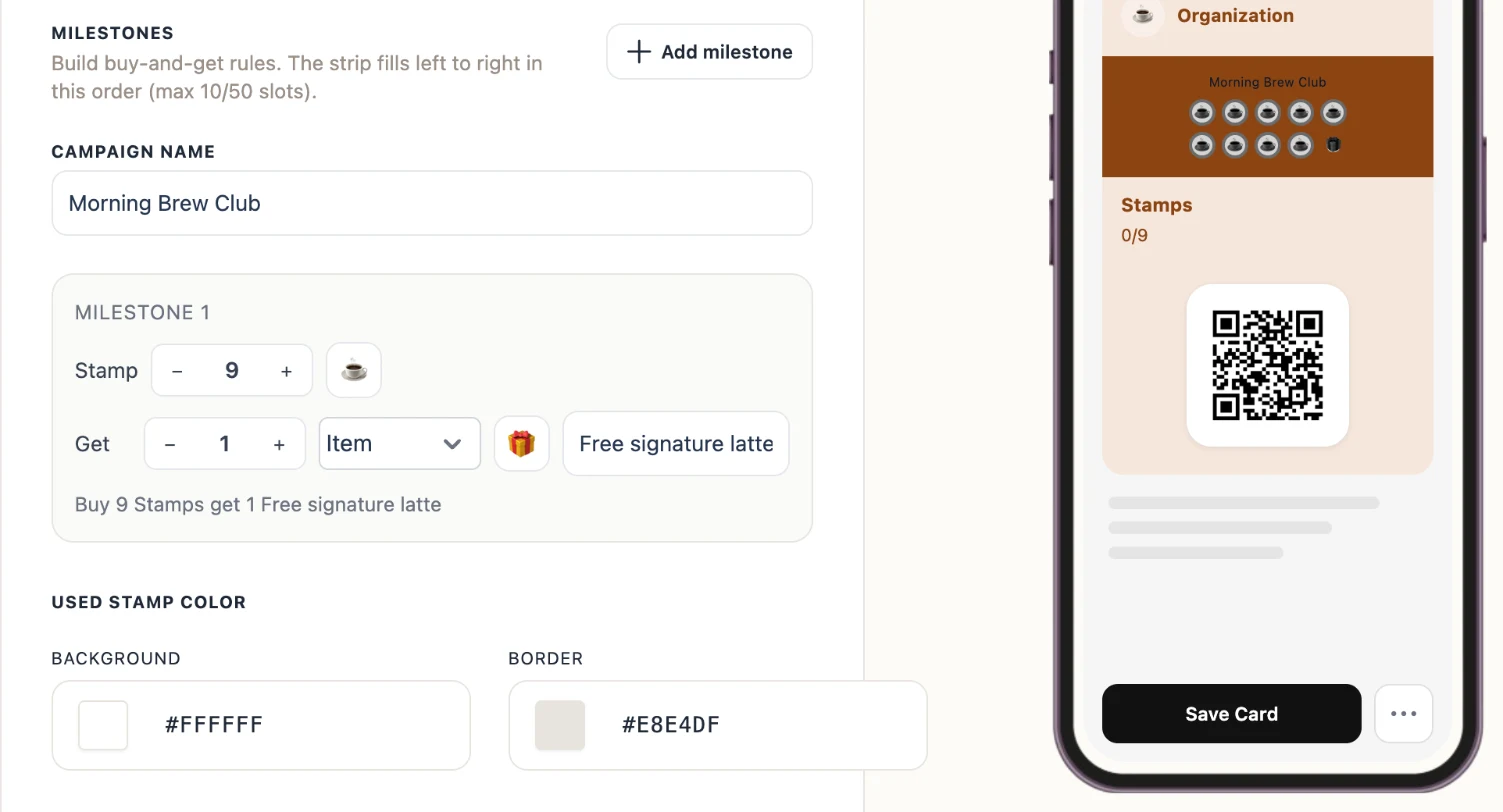
Add the card to your own iPhone before anyone else sees it. Apple Wallet works right away. Google Wallet passes stay in demo mode until you finish Google's one-time business profile and approval step. Until then, only Google accounts you list as admins, developers or test users can save the card on Android. Our guide on moving Google Wallet passes from demo mode to live shows the steps.
What does a one-week switch from paper look like?
A week is enough if you take one small job a day. Build and test early in the week, launch in the middle, and use the last days to move paper card holders over. The plan below assumes one location and a few staff.
| Day | What you do | Done when |
|---|---|---|
| 1 | Build the card in the wizard. Set up your Google Wallet business profile and request publishing access. | The card is on your iPhone, and Google has your request. |
| 2 | Test with staff: add a stamp, remove one, claim the reward | Every staff member has done each step once |
| 3 | Set up staff logins on the scanner app or a browser | Each staff member can scan at the counter |
| 4 | Print the QR code for the counter, tables and receipts | The QR code is where customers wait |
| 5 | Launch to iPhone customers. Add Android customers as soon as Google approves your account. | Staff ask every customer who can save the card |
| 6–7 | Move paper card holders to the new card | Their old stamps are on their phone |
Google does not say how long its review takes, so send the request on day 1. Until it is approved, only the Google accounts you list as admins, developers or test users can save the card. The card also shows a TEST ONLY label (Google for Developers, as of Oct 2026).
Moving paper stamps is the step most owners forget. When a regular shows a paper card with 6 stamps, ask them to scan your QR code and save the new card. Then scan it, tap the first 6 empty stamps and press Add Stamps once. Keep or tear up the paper card, whichever you prefer.
Set a cut-off date for paper cards, such as 30 days after launch. Put it on a sign at the counter so nobody feels caught out.
How do staff add stamps at the counter?
Staff scan the customer's card with the free EpassCard scanner app or any phone browser at scan.epasscard.com. They tap the next empty stamp on the screen, or several in a row, and press Add Stamp. The card on the customer's phone updates, which can take up to a minute.
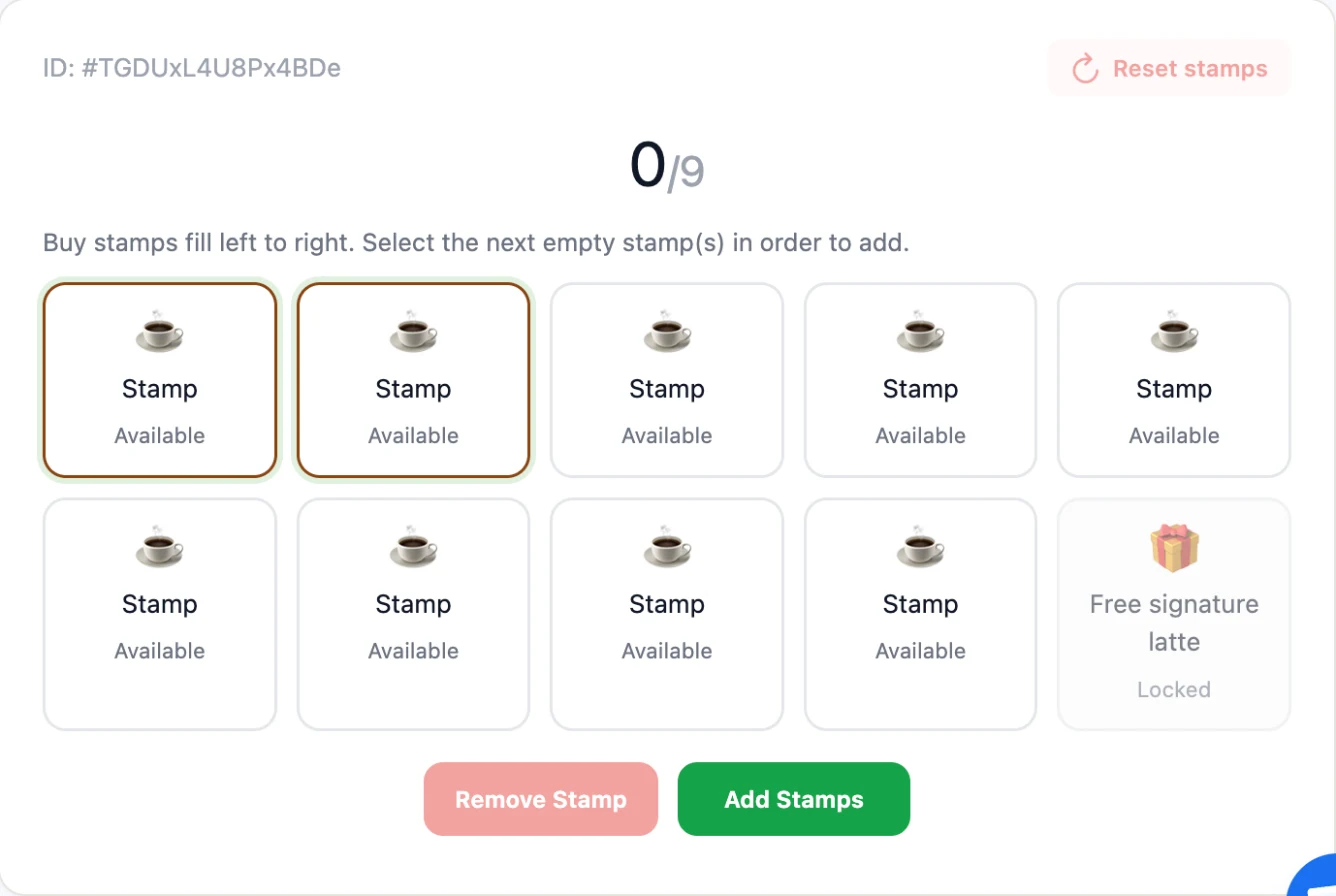
When the card is full, staff claim the reward on the same screen. Then they press Reset stamps to start the next card. A full card does not reset by itself, so make this part of the routine.
A few settings help on a busy counter:
- Lock stamp removal lets staff add stamps but never take them away.
- Staff roles let counter staff stamp cards without touching balances.
- Every add, remove, reset and claim is saved in the card's history. You can see who did what.
Give staff one line to say at the till, such as: "Would you like our stamp card on your phone? Scan this code and I will add today's stamp."
How do you bring customers back with the card?
Message the people who hold your card. You can send a push message to one customer or to everyone with the card. For example: "One more stamp and your next latte is free." On iPhone it shows on the lock screen.
Google caps these alerts. It allows up to 3 messages that trigger a notification per card in 24 hours (Google for Developers, as of Oct 2026). One well-timed message beats three in a day anyway.
Customers stay in control. They can remove the card at any time, for example with Remove pass in Google Wallet (Google Wallet Help, as of Oct 2026). Only message people who saved your card, and follow the consent and privacy rules where you trade.
Starting before a busy season such as the Christmas weeks helps. Your regulars will already hold the card when the quiet weeks in January arrive.
How do you know it is working?
The stamp card report shows how many cards were created, added to a wallet, completed and claimed. It splits the numbers by Apple and Google, and you can export them as a CSV file. Check it once a week.
- Many cards created, few added to a wallet: fix how staff hand out the link or QR code.
- Many cards added, few completed: the card may need too many stamps. A shorter card keeps the reward in sight.
- Few Google cards: check that Google has approved your account.
What should you look for in a stamp card tool?
If you are comparing tools, check these points before you sign up:
- Both wallets, no app. Customers should save the card to Apple Wallet or Google Wallet without installing anything.
- Fast stamping. Staff should add one stamp or several in one scan.
- Control over staff. Look for staff roles, a way to block stamp removal, and a log of who did what.
- Clear limits and prices. You should know how many cards you can issue before you pay.
- Reports you can export. You need to see sign-ups and rewards claimed.
What does a digital stamp card cost?
With EpassCard you can start on the Free plan, which allows 50 live passes and 3 templates. When more customers hold your card, Starter costs $19 a month for 250 live passes. Prices below are from the EpassCard pricing page as of Oct 2026.
| Plan | Monthly | Yearly | Live passes |
|---|---|---|---|
| Free | $0 | $0 | 50 |
| Starter | $19 | $156 | 250 |
| Growth | $39 | $324 | 1,000 |
When you reach your limit, cards already in use keep working. New cards need an upgrade. Deleting a pass frees its slot. Expired or switched-off cards still count.
Here is a worked example. Say a salon has about 180 regulars who might join. The first 50 fit on the Free plan. Once more join, Starter at $19 a month covers up to 250. Remember the reward has a cost too. Every free haircut or coffee you give away is part of what the program costs you.
What can't a digital stamp card do?
A digital stamp card is a simple tool, and it has limits. Know them before launch day:
- It does not read your till. Staff add stamps, or connected software does it through the API. A stamp never appears from a purchase amount by itself.
- It does not reset by itself. Staff press Reset stamps after the reward is claimed.
- Not everyone will join. Some customers have no smartphone or will not add a card. Decide whether you keep a few paper cards for them.
- Google limits alerts. Up to 3 alerts per card in 24 hours.
- Google Wallet needs one approval. Cards stay in demo mode until you finish Google's one-time business profile and approval step.
None of these stops a small shop from switching. They just shape how you train staff and what you promise customers. When you are ready, create your free stamp card and add it to your own phone first.
Frequently asked questions
Do my customers need to download an app?
No. The card goes into Apple Wallet on iPhone or Google Wallet on Android, which are already on most phones. Customers tap a link or scan your QR code, then tap the add button. There is no account to create and nothing to install.
Does one card work on both iPhone and Android?
Yes. You design the card once in EpassCard. The same link shows the Apple Wallet button on an iPhone and the Google Wallet button on an Android phone. On a computer it shows a QR code to scan with a phone.
How many stamps should my card have?
EpassCard allows up to 50 stamp slots on the strip, or 10 in the dots layout. Most visit cards need far fewer. Pick a number a regular can fill in a few weeks, so the reward feels close. A short card keeps the free item in sight.
Can customers keep the stamps from their paper card?
Yes. Ask them to save the new card. Then scan it, tap as many empty stamps as their paper card has, and press Add Stamps once. Their progress carries over, and you can collect the old paper card at the same time.
What happens when I pass 50 cards on the Free plan?
Cards already in use keep working. To issue more, upgrade to a paid plan. Starter is $19 a month for 250 live passes and Growth is $39 a month for 1,000, as of Oct 2026. You can change plans at any time from Billing.
Do I need an Apple Developer account?
No. EpassCard issues Apple Wallet passes for you, so you do not need your own Apple Developer account or certificates. Google Wallet runs on your own free Google account and needs Google's one-time business profile and approval step before cards leave demo mode.