

Gym membership card Apple Wallet setup: a New Year guide
A gym membership card Apple Wallet pass is your member card on the phone. Members save it from a link, QR code or email, with no app to download. Staff scan it at the front desk. The expiry date sits on the card, and you can switch it off when a membership lapses. The same card works in Google Wallet.
- Members need no app. The card goes into Apple Wallet on iPhone or Google Wallet on Android.
- You can issue cards to your whole member list at once from a spreadsheet.
- Lapsed members get switched off in one click, and the card greys out on their phone.
- The EpassCard Free plan covers 20 live passes with no payment card. Team is $29 a month for 1,000 (as of Nov 2026).
Get your cards ready before New Year's Day, and every January joiner leaves the desk with one. This guide covers the full life of a card: design, issue, expiry, renewal, lapse and the door check.
What does a gym membership card in Apple Wallet do that plastic cannot?
A wallet card can change after you hand it out. You can send a renewal reminder to the lock screen or switch the card off. You can also change the expiry date (on templates set to Ask on Each Pass). A plastic card can do none of that. It also costs nothing to replace when a member loses it.
| Plastic or key tag | Wallet membership card | |
|---|---|---|
| Handing it out | Print, encode, hand over | Share a link, QR code or email |
| Lost card | Reprint and charge or absorb the cost | Send the link again |
| Expiry | Staff check a list | The date is on the card; expired cards grey out |
| Lapsed member | Card still looks valid | Switch it off in both wallets |
| Reaching members | Email or posters | Push messages to the lock screen |
Members add it the way they add a boarding pass. On iPhone they tap Add to Apple Wallet and then Add, as Apple's own guide shows. On Android they tap Add to Google Wallet and then View in Wallet, per Google Wallet Help.
Which expiry setting fits your memberships?
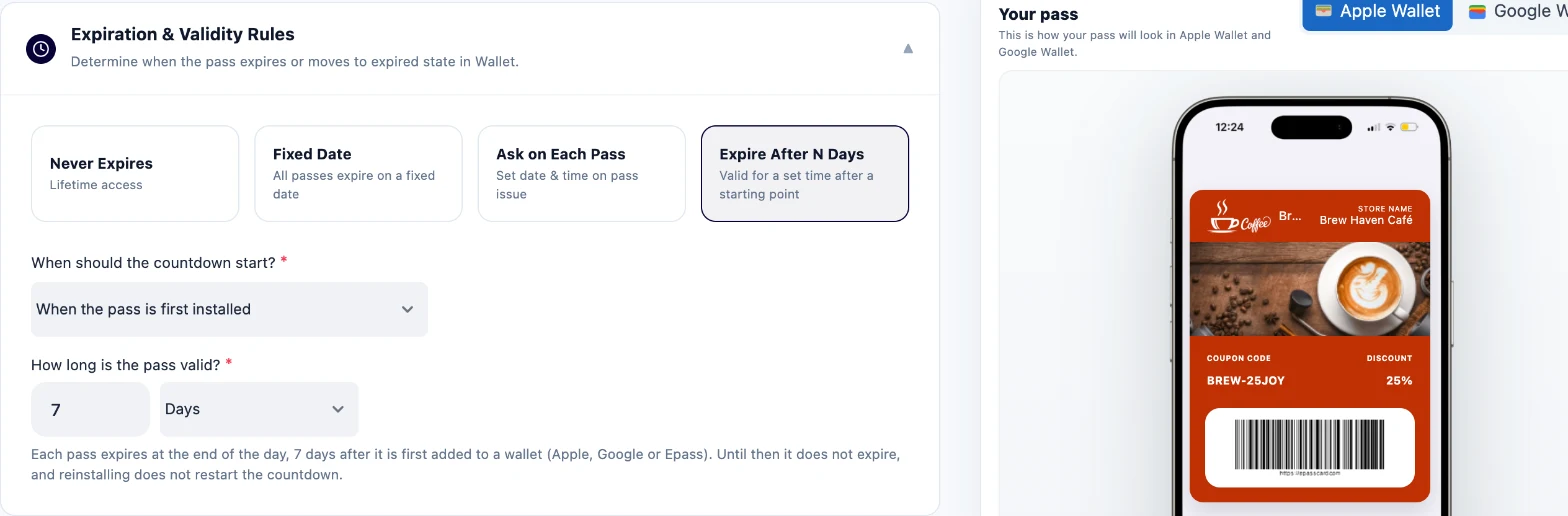
Match the expiry to how members pay. Rolling monthly members should get a card that never expires, and you switch it off if they stop paying. Fixed-term members, such as an annual plan or a New Year starter offer, should get a card with a set end date.
EpassCard has four expiry settings on a pass template. Here is how they map to common gym plans.
| Membership type | Expiry setting | Why |
|---|---|---|
| Rolling monthly | Never Expires | Billing renews each month; you deactivate the card only if payment stops |
| Annual plan, new joiners | Expire After N Days (1 year), starting "When the pass is created" | Each new member gets one year from the day their card is made |
| Annual plan, existing members | Ask on Each Pass | Each member keeps their own end date; put it in a column of your CSV |
| New Year starter offer (for example, January to March) | Fixed Date | Every card from that template ends on the same day |
| Mixed start and end dates | Ask on Each Pass | You set each member's end date when you issue the card, or in a column of the bulk CSV |
The expiry date is printed on the back of the card. When it passes, the card greys out and the barcode stops working.
One tip for New Year offers: build the starter offer as its own template. Then the January joiners get their own end date and their own messages. Your existing members are not affected.
How do you set up and issue cards before January?
Build one membership template, test it on your own phone, then issue cards to existing members from a spreadsheet. New members can add the card from a QR code at the front desk. Plan to finish this in early December so January sign-ups are covered.
- Create a free account at app.epasscard.com. The Free plan needs no payment card.
- Open Pass Template V2 and click Create new template. Pick the Membership preset. It already has a membership type, the member's name and an Expiry field on the card. The date that actually ends the card is the expiry setting in step 4.
- Add your logo and colors. Choose the fields members see: name, member number and tier, such as "Gold" or "Off-peak". Pick a QR code or barcode your front desk can scan.
- Set the expiry using the table above. Then save the template and add a test card to your own iPhone.
- Export your member list from your gym software as a CSV file. One row is one member. If your template uses Ask on Each Pass, include each member's end date as a column.
- On the template, click Bulk issue passes. Give the job a name, keep the type as Create, upload the file and tick Send passes via E-mail after creation. Each member gets an email with the Add to Wallet buttons.
- For walk-in sign-ups, turn on public pass creation and print the QR code for the desk. New members fill in a short form and save the card on the spot.
The bulk job gives you a report of any rows that failed, such as a missing email. You can run one bulk job at a time per account, so split a very large list into batches.
Apple Wallet works right away. Google Wallet cards stay in demo mode until you finish Google's one-time business approval, which is free. Start that step on day one so Android members are not left waiting.
How do renewal reminders work?
You send a push message from the template to every member who holds the card, or to one member. It shows on the lock screen like a text. You can schedule it and add the member's name, so a renewal reminder reads like a personal note.
On the template, click Send notification. Some messages that suit a New Year drive:
- "Hi {Name}, your membership renews on {Expiry}. Renew at the front desk to keep your card active."
- "New Year class timetable is live. Show this card at the desk to book your first class."
- "The pool reopens Monday. Your card is your entry pass."
How you renew depends on the expiry setting. On an Ask on Each Pass template, open the member's pass and change the end date. The new date shows on their phone, and wallet updates can take up to a minute. On a Fixed Date or Expire After N Days template, the date comes from the template. So in the dashboard you cannot change it for one card. Your developer can change it through the API, or the member can move to a new card. If you expect many renewals, use Ask on Each Pass for fixed-term plans. Push messages are unlimited on every plan.
Two limits to plan around. Google Wallet allows up to 3 push alerts per card in 24 hours, per Google's developer guide. And members can remove the card at any time. Treat these messages like any other marketing: useful, rare and in line with your privacy rules.
What should you do when a member lapses?
Switch the card off. Open the member's pass and click Deactivate. The card turns off in Apple Wallet and Google Wallet, and staff see it as invalid at the door. If the member pays again, click Activate and the same card works again.
Do not delete a lapsed member's pass first. Deleting a pass frees its slot in your plan, but the card stays on the member's phone as it was. So deactivate it, or let it expire, and only then delete it.
Keep an eye on your limit, too. Expired and deactivated cards still count toward your live passes until you delete them. A spring clean-up after the New Year rush keeps your count honest.
How do staff check cards at the door?
Staff scan the card with the free EpassCard scanner app on iOS or Android, or with scan.epasscard.com in any browser. The screen shows Valid or Invalid, the member's details and the expiry date. A USB or handheld reader also works with the browser.
- Staff roles: give front-desk staff permission to verify cards without access to the rest of your account.
- Scan logs: every scan is recorded with the time and the staff member, so you can see check-ins per card.
- Team members: add as many staff as you need. They cost nothing extra on any plan.
The card does not open doors by itself. Staff, or an access system you already run, scan the barcode.
What does a wallet membership card cost for a gym?
Plans are priced by live passes, which is the total number of cards that exist, not a monthly allowance. Count every member, plus room for January joiners. Prices below are from the EpassCard pricing page as of 12 Nov 2026.
| Gym size | Plan | Live passes | Price |
|---|---|---|---|
| Pilot with staff and a few members | Free | 20 | $0 |
| Studio up to 300 members | Launch | 300 | $15 a month or $144 a year |
| 600 members plus 150 January joiners | Team | 1,000 | $29 a month or $276 a year |
| Several sites, up to 5,000 members | Business | 5,000 | $65 a month or $624 a year |
Larger chains and clubs go up to Scale+ at 50,000 live passes, or a quote above that. You can book a demo to plan a big member import.
Your card connects to what you already use. Any system can issue, update and switch off cards through the API. Webhooks tell your system when a member adds or removes the card. A sign-up form embeds on any website. If your gym runs on WordPress, our guide to WordPress membership cards in Apple Wallet covers the plugin. See the membership card page for every feature.
What will a wallet membership card not do?
It will not take payment. Billing stays in your gym software or at the desk, and the card shows the result. Plan for these limits before January:
- No automatic renewal payments inside the card.
- Google Wallet cards need Google's one-time approval before they go live for everyone.
- Bulk jobs send email, not text messages. Texting needs your own SMS gateway.
- Location alerts on the lock screen only work if the member allows location for their wallet.
If those fit how you run your gym, start with one template on the Free plan. Add it to your own phone, then issue your member list in December. Your January joiners will walk out with their card already in their wallet.
Frequently asked questions
Can members add their gym card to Apple Wallet themselves?
Some apps copy a gym's barcode into a homemade pass. That copy cannot show the real expiry date, cannot be switched off and breaks if the gym changes its barcodes. An official card issued by the gym stays in step with the membership. Ask your gym whether it offers one.
Do members need to download an app?
No. The card goes into Apple Wallet on iPhone or Google Wallet on Android, which are already on the phone. Members tap the Add to Wallet button from a link, QR code or email. The EpassCard Android app is optional.
Can the card collect membership fees or renew automatically?
No. Payment stays in your gym software or at the front desk. The card shows the result: a new expiry date after renewal, or switched off if the membership ends. Any system can update the card through the API.
Do I pay extra for front-desk staff accounts?
No. Team members cost nothing extra on every EpassCard plan, including Free. Plans are priced by live passes and templates. You can give each staff member a role that only lets them verify cards.
How many members can I put on the Free plan?
The Free plan has 20 live passes and 1 template, with every feature and no payment card. That is enough to test the card with your staff and a few members. Most gyms then move to a paid plan sized to their member count.