

Last-minute Black Friday wallet coupon: set it up today
It is not too late for a Black Friday wallet coupon. You can build one in Apple Wallet and Google Wallet today, send it tonight or on Friday morning, and let it run through the weekend. This short guide covers the steps that matter when you only have a day.
- Black Friday is Friday, Nov. 27, 2026. Small Business Saturday is Nov. 28, and Cyber Monday is Nov. 30.
- Build the coupon from the regular Coupon card preset, and set the end date before you send it.
- Send one push message a day. Google Wallet allows 3 alerts per card in 24 hours.
- You can start on the Free plan with 20 live passes. No payment card is needed.
For the basics of how a wallet coupon works, read our guide to Apple Wallet coupons.
Why a wallet coupon still works at the last minute
A wallet coupon sits next to the customer's cards and tickets, not in a crowded inbox. Saving it takes one tap, with no app to install: Apple Wallet comes on every iPhone, and Google Wallet is free on Android.
After you send it, you can still change it. Fix a typo or move the end date, and every saved coupon updates within about a minute. A push message shows on the lock screen like any phone alert, and on iPhone a tap opens the pass (Apple Support).
Set it up today in seven steps
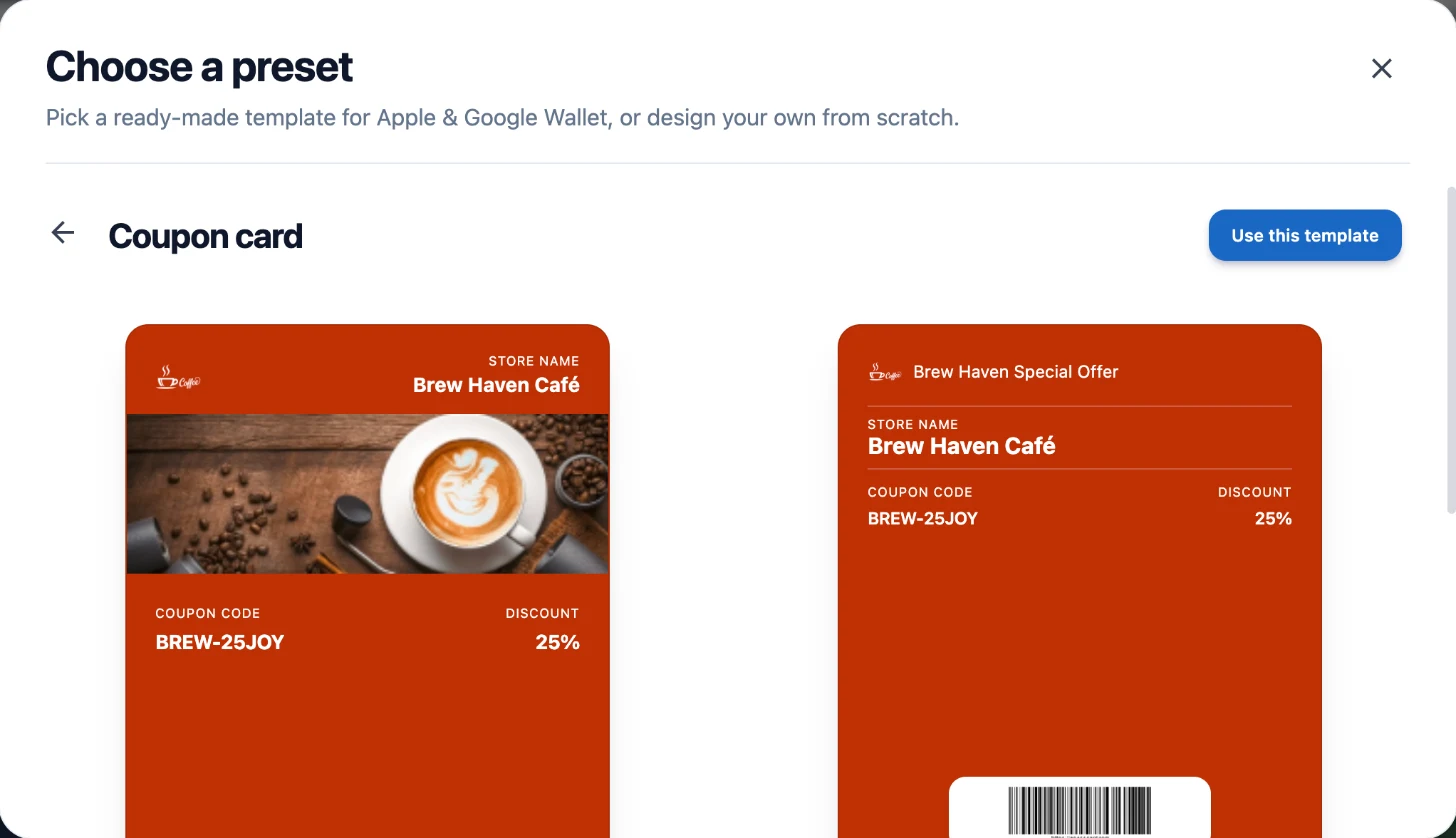
- Create a new template. In Choose a preset, open Coupon card and click Use this template.
- Write the offer in a few words, such as "20% off everything". Put the terms on the back.
- Add your logo, colors and a banner image. The preview shows the Apple Wallet and Google Wallet versions side by side.
- Choose whether the coupon is one-time (used up on the first redemption) or reusable (can be redeemed again until it ends). For a single Black Friday discount, one-time is the usual choice.
- Pick a barcode type. A QR code works with the free EpassCard scanner app or any phone browser.
- Open Expiration & Validity Rules, choose Fixed Date and set the last day of your sale.
- Publish the template, issue one coupon to yourself and add it to your phone.
A Fixed Date coupon works until the end of that day in your account's time zone. Check the time zone in Company settings before you publish. If it is left on UTC, a coupon in a U.S. shop ends in the afternoon or evening local time.
Changing the date later updates coupons already on phones. So if the sale goes well, move the end date to Cyber Monday, Nov. 30, and tell holders in your next message.
Get it to customers tonight
There are two quick ways to hand it out:
- To a list you already have: upload it as a spreadsheet, and EpassCard emails each person their own coupon.
- To anyone: turn on public pass creation, then share the sign-up link or QR code on your site, in social posts and at the register. Shoppers fill in a short form, and their phone offers Add to Apple Wallet or Google Wallet.
If your business runs its own system, a developer can issue coupons through the API, and webhooks report when a coupon is saved or expires. On any website, you can paste the sign-up form or QR widget into a page.
One thing to check first: Google Wallet passes stay in demo mode until you finish Google's one-time business approval. If you have not done it yet, start today, and see how to take Google Wallet passes live. Apple Wallet needs nothing extra.
Three push messages for the weekend
Send one message on each sale day. That stays well under Google's limit of 3 alerts per card in a 24-hour period (Google Wallet developer guide).
- Friday, Nov. 27, early morning: "Black Friday is here. Show this coupon at the register for 20% off. Valid through Sunday."
- Saturday, Nov. 28, mid-morning: "It is Small Business Saturday. Your 20% off still works today and tomorrow."
- Sunday, Nov. 29, around midday: "Last day. Your 20% off ends tonight."
You can schedule all three now. Only people who saved the coupon get these messages, and they can remove it at any time. Your usual consent and privacy rules still apply.
What it costs
A small test fits the Free plan: 20 live passes, 1 template and no payment card. Bigger lists need a paid plan. Prices are from the EpassCard pricing page, as of 12 Nov 2026.
| Plan | Price | Live passes |
|---|---|---|
| Free | $0 | 20 |
| Solo | $10 a month | 150 |
| Launch | $15 a month | 300 |
| Team | $29 a month | 1,000 |
| Plus | $45 a month | 2,500 |
Live passes are all the passes on your account at one time, including expired ones. Push messages are unlimited on every plan. Larger plans go up to 50,000 live passes, and bigger retailers can ask for a quote.
What to know before Friday
- Your register applies the discount. The coupon shows the offer and a barcode. Staff or your point-of-sale system take the money off.
- Scanning checks the coupon. It confirms the coupon is real and in date, and every scan is logged.
- Location alerts need permission. The coupon shows near your shop only if the customer allows location for their wallet.
- Updates take up to a minute. Test your coupon on one iPhone and one Android phone before you send it.
On Monday, open the pass reports for the coupon to see how many were saved and scanned. Then send a thank-you coupon that expires 7 days after it is saved, to bring weekend shoppers back.
You can try it today on the Free plan: start free on EpassCard.